Song Turbo Developer Certification - Foundations
Part 5: RTK Query
This part deals with setting up and using RTK Query. RTK Query is a powerful data fetching and caching tool. It is designed to simplify common cases for loading data in a web application, eliminating the need to hand-write data fetching & caching logic yourself.
Concepts to be grasped
- REST API
- GraphQL (what is it?)
- Queries vs Mutations
Reading material
Tasks
1. Setup turbo-posts-api addon
Addons are modular packages which are consumed by core packages to provide functionality to apps. The idea is that an app should not directly interact with an addon and only use it through the core packages.
- Create a new addon package
turbo-posts-apiinpackages/addonsdirectory. - The package should contain following files:
package.json: Contains info about the addon package:name: Name of addon (prefixed with@turbo-blog/). Eg:@turbo-blog/turbo-posts-apiversion: Version should always be0.0.0in monorepo- Other fields like
main,module,types,private,files,scripts,dependencies,devDependencies,jestcan be duplicated from other addons like@turbo-blog/example-api. - Update the
dependenciesanddevDependenciesto only have packages are are utilised by your addon.
- Duplicate files like
tsconfig.json,.eslintrc.jsandREADME.md. Update the README to describe your addon. src/index.ts: This is the entry point for the addon. It should export methods for this addon.
Hint: This package should also be re-exported from
@turbo-blog/apipackage.Note: you will have to run
yarnand thedevcommand again for TurboRepo to pick up the new addon.
Why do we have the concept of addons in Song Turbo?
2. Create turboPostsApiSlice
createApi is the core of RTK Query's functionality. It allows you to define a set of endpoints describe how to retrieve data from a series of endpoints, including configuration of how to fetch
and transform that data.
- Setup a new
addonpackage inpackages/addonsdirectory. - Create a new apiSlice called
turboPostsApiSlicein/packages/addons/turbo-posts-api/with following properties:reducerPath: "turboPostsApi"baseQuery: Use RTK Query'screateBaseQueryto create a base query withbaseUrl='https://dummyjson.com/ (opens in a new tab)'.endpoints: A function that returns an empty object. In Song turbo, the endpoints are injected later on to maintain good file structure.
- This slice and its middleware should be added to
@turbo-blog/storepackage instore_config.ts.
Hint: This slice should be re-exported from
src/index.tsfile.
Inject posts endpoints
- Create a sub-folder in
turbo-posts-apiaddon calledpostswith anendpoints.tsfile. - In the
endpoints.tsfile, create anextendedTurboPostsApiSlicewhich injects endpoints toturboPostsApiSlice. - The following endpoints should be injected:
getTurboPosts: Get posts from API service (path:posts, method:GET). Include a transformer function which will transform the data to the shape of theITurboPost[].getTurboPost: Get post by ID from API service (path:posts/{id}, method:GET). Include a transformer function which will transform the data to the shape of theITurboPost.
- Export the generated hooks from
extendedTurboPostsApiSlice:useGetTurboPostsQuery,useGetTurboPostQuery - Create a file called
types.tsin the posts folder. In that file put the definitions of the data coming from the API. The transform functions will tranform from these into the internal types. These types should not be exposed to the app but rather only be used "inside" the API slice - Put transformer functions in their own file called
utils.tsinside thepostsfolder
The folder structure should look like this (the index files only re-export functions):
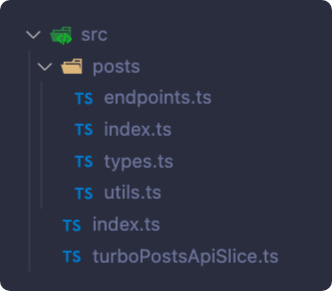
Note: Docs for the API service used (opens in a new tab).
Hint: These hooks should be re-exported from
src/index.tsfile.
What is a 'slice' in RTK? And why is it a nice concept do you think?
3. Use the new API hooks in routes (client side api fetching)
- Create a copy of the folder
/src/pages/turbo-postsand call it/src/pages/turbo-posts-api. In those files we will update to make them get the posts from the api.
/turbo-posts-api route
- Remove the function
getStaticProps. - Import
useGetTurboPostsQueryfrom@turbo-blog/apipackage and use it to fetch posts. These posts must be used for the list instead of the one from the props. - Handle the error and loading state.
/turbo-posts-api/[id] route
- Remove the functions
getStaticPropsandgetStaticPaths. - Import
useGetTurboPostQueryfrom@turbo-blog/apipackage and use it to fetch current post. Use thispostto render theTurboPostcomponent. - Figure out how to access current
idin page component needed by the hooks. - Handle the error and loading state.
Note: For this task, we have changed the SSG (static props/paths) setup done in previous steps to a simpler CSR setup.
4. Back to SSG again
We now have the fetching of posts done on the client. You can check this by opening the browser develop tool and looking in the network tab. There you should see a request to dummyjson.com when you click a blog post. We do have caching in RTK Quesry so if you go back to the list and click the same blog post again it should not fetch the data from the server but use the cached version. There are various ways to influence this caching behaviour. Read the docs on RTK for more info.
Another concequence can be seen by looking at the source code in the browser. You wont see the actual blog but rather just the result of the first render of the component. And in the first render we dont have any data yet. This is bad for SEO amongst other things. Lets try and fix so that the data is actually available the first time the component renders.
To do this we have to turn on SSG or SSR again by adding in the special functions used by NextJs.
- Create a copy of the folder
/src/pages/turbo-posts-apiand call it/src/pages/turbo-posts-api-ssg. In those files we will update to prefetch and prefill the store at build time. - In
/src/pages/turbo-posts-api-ssg/index.tsx- Add a getStaticProps function
- In
/src/pages/turbo-posts-api-ssg/[id].tsx- Add getStaticPaths and getStaticProps functions
In these functions we need to get access to the store and pre-fill it with data from the API so that when the page/component tries to fetch data from the api it will see that there is already cached data to be used.
Here are parts of the functions. You need to fill in the rest.
// getStaticPaths
export async function getStaticPaths() {
  const store = makeStore()
  ...
  // Use actions from the slice to get posts
  // Use posts to create a `paths` array
  ...
  return {
    paths,
    fallback: true,
  }
}
// getStaticProps
...
export const getStaticProps = wrapper.getStaticProps(
(store) => async (context) => {
const id = context.params?.id
...
// use actions from the slice to get the blog post
...
return {
props: {}, // Return empty props. The data is in the store now.
}
})
Read more about this topic at RTK docs: https://redux-toolkit.js.org/rtk-query/usage/server-side-rendering (opens in a new tab)
After you have correctly implemented these three functions you should be able to see that when you browse the blog posts there are no networks requests made and if you look at the page source, the actual posts are there in the html.
Where does the wrapper come from and what does it provide? What data does
the context include?
5. Commit your changes
Evaluation
Your pages structure should now look like this:
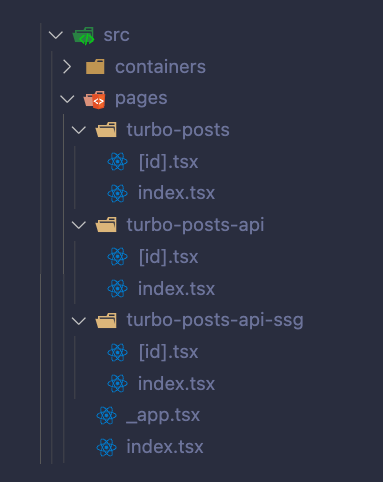
-
To verify the store setup, in the terminal, run the following command:
yarn dev:webThe server should start and you should be able to access the production application at localhost:3000 (opens in a new tab) in your browser.
Open the redux-devtools and the
Statepanel. TheturboPostsApistate should be there with a bunch of sub-properties. -
The
/turbo-postsroute must render a list of posts' titles (30 posts). Clicking a title should redirect to the/turbo-posts/[id]route. -
The
/turbo-posts/[id]route must render the post's title and its body. Should show error for id=200.